You are using an unsupported browser. Please update your browser to the latest version on or before July 31, 2020.
close
You are viewing the article in preview mode. It is not live at the moment.
> 非托管网络交换机 > Installing your Linksys unmanaged switch
Installing your Linksys unmanaged switch
print icon

The Linksys unmanaged switch offers a quick and easy solution to extend your office network with a plug-and-play installation. It has built-in full-duplex 10/100/1000 switch to connect your wired Ethernet devices together at up to Gigabit speeds. It also features auto-sensing ports which automatically optimize the speed for each connected device.

This article will show you how to set up the Linksys unmanaged switch.

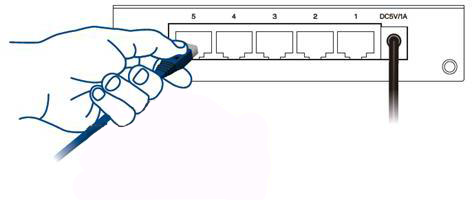
1. Plug one end of the power adapter to your switch then the other end to a working power source.

2. Use an Ethernet cable to connect your router / network device to the switch.

5913

反馈
0 / 0 觉得这很有帮助

Linksys
Now
Support
滚动到顶部图标